Pokemon card wishlist app: choose your next three cards
By Lee, founder of Chaseboard4 min read
Published October 20, 2026. Updated October 21, 2026.
The short answer
Keep a Pokemon card wishlist by recording each card's set, number, version and condition. Use a notes checklist, spreadsheet or wishlist app, and mark cards bought as you find them. Start with the next three cards you'd love to put in your binder.
Spotting a sold listing for the Vaporeon you'd forgotten you wanted stings. Give that card a home on your list while you can still picture it.
Pick a Pokemon card wishlist app that fits your hunt
Use notes for a short list, a spreadsheet for a bigger hunt, or a Chaseboard board for matching-listing alerts. Pick the job you need help with first.
| Your list | Good for | Try this first |
|---|---|---|
| Notes app | A few wants you can pull up at a card show | Make a checklist called Next three cards |
| Spreadsheet | Sorting a bigger hunt by set, version or priority | Give every version its own row |
| TCGplayer save for later | Returning to cards in your shopping cart | Copy long-term wants into your main list too |
| Collectr or another collection app | Browsing cards alongside your collection | Add one wanted card and practise finding it again |
| eBay | Returning to a search with matching-listing emails | Check the results before saving the search |
| Chaseboard | Keeping active hunts together with alerts for matching eBay listings | Start a board with one card |
TCGplayer's app has saved lists, separate from cart save for later. Collectr's collection filters include an on-watchlist option. Try one wanted card and check that you can find it apart from cards you own.
What to put on your Pokemon card wishlist
A wishlist entry needs the card, set, number, version, language and condition. Try this entry for a Jungle Vaporeon:
Name the card: Vaporeon, Jungle, 12/64.
Choose the copy: holo, English, raw, lightly played or better. Use the condition guide if you're torn.
Set your limit: decide what you'll spend, including shipping, before opening listings.
Pick its place in the queue: hunting now, someday or bought. Put the card you want most first.
Give a reverse holo its own row, even when you already own the regular card, so you can check which finish you still need. If you're completing a master set, list each missing version separately.
Let the empty pocket pick your next hunt
A binder gap is a pretty good reminder. On this page of my Base Set, Bulbasaur and Squirtle have their whole evolution lines. Charmander is still waiting for Charizard. Open your own binder and pick one gap you'd love to fill.
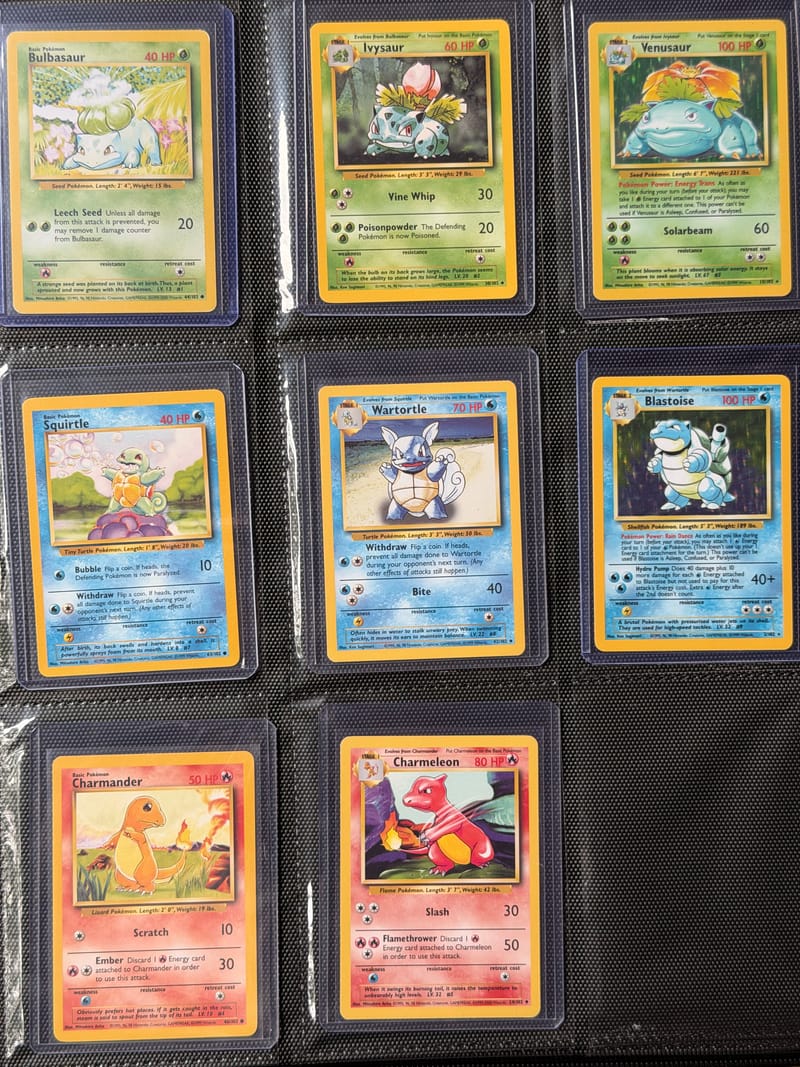
Keep your top three wants at the top of your note, or filter your spreadsheet to hunting now. The someday list can hold the glorious distractions. When you buy a card, mark it bought straight away so you don't come home with the same missing common twice.
How to get alerts for cards on your wishlist
eBay saved searches send email alerts when new listings match the search you saved. If you've already got a useful search, keep it. Follow the exact-card search guide, check the results, then choose Save this search on eBay.
On Chaseboard, a watch is the card you want plus your buying criteria. Chaseboard alerts you as soon as we spot a matching listing for that watch. Keep your longer checklist where it works for you, and try the board with one card:
Start a board. Find the card and select the right version.
Choose the copy you want. Set your price range and raw condition or grading preferences, then save.
Choose where to get alerts. Sign in to save your board to your account, then choose an alert channel in Settings. Check the plans for board limits.
Enjoy the find. Check the listing photos before buying. Once it's yours, remove the watch and tick it off your list.
FAQ
Collectr has a watchlist option, the TCGplayer app has saved lists, and Chaseboard keeps active hunts on a board with alerts for matching eBay listings. Try one wanted card in the tool that fits how you collect.
Record the name, set, card number, version, language, condition or slab grade, and your spending limit. Add hunting now, someday or bought so you know where you stand. Fill in one complete entry before adding the rest.
A notes checklist or spreadsheet can hold your Pokemon card wishlist. Keep it on your phone for card shops, then tick each card off when you buy it.
Chaseboard can alert you when it spots an eBay listing matching a watch on your board. Add the card, choose your buying criteria and set up an alert channel in Settings.
Related
Sources
- TCGplayer, Saving and Sharing Lists, read October 20, 2026
- TCGplayer, Buying from TCGplayer Direct, read October 20, 2026
- Collectr, Track your collection, read October 20, 2026
- eBay, Saving a search, read October 20, 2026
Last reviewed October 20, 2026.
How this page was written: drafted with AI assistance from Lee's own answers, then checked claim by claim against the sources above.
About the author
Lee, founder of Chaseboard
Lee buys Pokemon cards on eBay and builds Chaseboard.